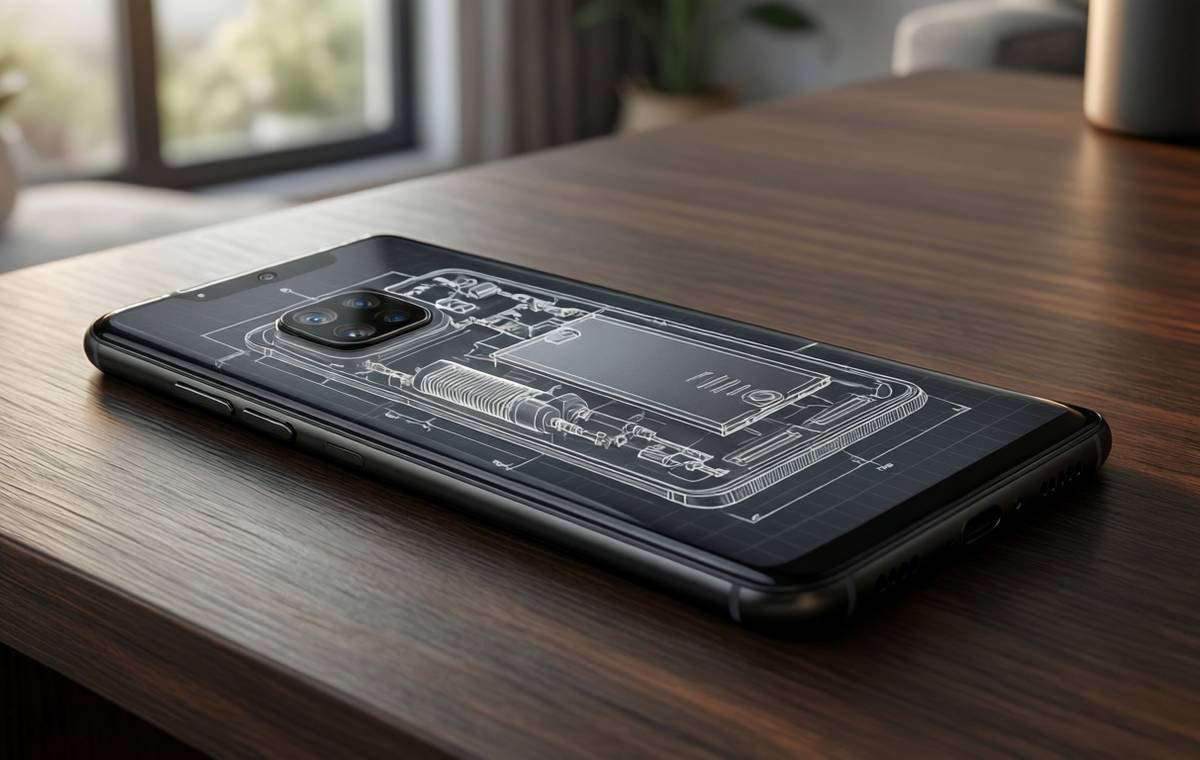
Summary of Pixel 11 Blueprint Wallpapers: A Peek Inside Google's Next Phone
- Google has shared two new blueprint-style wallpapers for the Pixel 11 series, showing the phone's internal components from the front and back.
- The front-facing wallpaper can align with the phone's frame, revealing the front camera, vapor chamber cooling, USB-C port, and speaker.
- The rear view displays the camera module, battery, and other parts, but requires a bit of cropping to fit the screen properly.
- This isn't the first time Google has offered teardown-style wallpapers; similar designs appeared for the Pixel 7 Pro in 2023.
- The wallpapers are a fun way to personalize your Pixel 11 while showcasing its engineering, and they're available now from Google Japan.
A New Look Inside the Pixel 11
Google has a fun surprise for Pixel 11 fans. The company recently shared two new blueprint-style wallpapers that show off the internal design of the upcoming Pixel 11 and Pixel 11 Pro. Instead of the usual abstract art or scenic photos, these wallpapers give you a peek at the phone's guts—think of it as a technical drawing brought to life on your lock screen.
The wallpapers were posted through the official Google Japan account on Twitter/X. They come in two versions: one showing the front of the phone and one showing the back. Both are designed to look like engineering blueprints, with clean lines and labeled components. It's a clever way to celebrate the hardware that goes into making a modern smartphone.
For anyone who loves knowing how their device works, these wallpapers are a treat. They turn something as ordinary as a lock screen into a mini anatomy lesson. And they're not just for show—they're actually designed to fit the Pixel 11's specific layout.
What the Front View Reveals
What this means for Pixel 11 Blueprint Wallpapers
The front-facing wallpaper is all about precision. When you set it as your lock screen, it can line up directly with the phone's frame. That means the wallpaper's lines and labels match up with the actual components behind the screen. It shows the front-facing camera, the vapor chamber cooling system, the USB-C port, the speaker, and various other parts.
This alignment is what makes the wallpaper feel special. It's not just a random image—it's a functional diagram that fits your phone like a glove. If you're the kind of person who likes to know exactly where the earpiece sits or how the cooling system works, this view is for you.
The attention to detail is impressive. The wallpaper makes the internal layout feel accessible, even if you've never opened a phone in your life. It's a subtle nod to the engineering that goes into every Pixel device.
The Rear View and Its Quirks
The rear-facing wallpaper is a bit different. It shows the camera module, battery, and many other internal parts. However, there's a catch: you have to crop this one in a bit further. Because it's displayed on the main screen, the buttons would end up on the wrong side if you don't adjust it.
That means a little extra work on your part. But for most people, the extra step is worth it. The rear view gives you a clear look at the camera array and the battery, which are often the most interesting parts of a phone's design.
It's a small quirk, but it's worth knowing about before you download. If you're not a fan of cropping, you might prefer the front view, which lines up perfectly with minimal effort.
A Nod to Pixel History
This isn't the first time Google has offered teardown-style wallpapers. Back in 2023, some Pixel 7 Pro teardown images were turned into a really cool wallpaper. That same year, Google also shared 25-year anniversary graphics that could be used as wallpapers.
So, there's a bit of a tradition here. Google seems to enjoy giving fans a behind-the-scenes look at their devices, even if it's just through a wallpaper. It's a fun way to connect with the hardware and appreciate the design choices that go into each phone.
For long-time Pixel users, this new set is a welcome addition. It's a fresh take on an idea that's been around for a few years, and it fits perfectly with the Pixel 11's launch.
How to Get Them on Your Phone
If you're ready to give your lock screen a technical makeover, here's what you need to do. The wallpapers were shared through the Google Japan account on Twitter/X. You can head there to download them directly, or keep an eye out for them on Google's official channels.
Once you've downloaded the images, here's a quick guide to setting them up:
- Open your phone's Settings app and tap on 'Wallpaper & style.'
- Choose 'Change wallpaper' and select the image you downloaded.
- Adjust the crop so the front view lines up with your phone's frame, or for the rear view, crop it in a bit to get the buttons on the right side.
- Tap 'Set wallpaper' and choose whether you want it on your home screen, lock screen, or both.
It's a simple process that takes just a few minutes. And the result is a lock screen that's both informative and stylish.
More Than Just a Pretty Picture: Pixel 11 Blueprint
These wallpapers are more than just a fun download. They're a conversation starter and a way to appreciate the engineering inside your phone. Whether you're a tech enthusiast or just someone who likes unique designs, they offer something different from the usual abstract art.
As we wait for the Pixel 11 to officially launch, these wallpapers give us a taste of what's to come. They highlight the phone's key features—like the vapor chamber cooling and the camera system—before we even get our hands on it.
So, if you're planning to pick up a Pixel 11 or Pixel 11 Pro, these wallpapers are a great way to get excited. And if you're still deciding, they might just tip the scale. After all, who wouldn't want a lock screen that shows off the inner workings of their next phone?
For more on the Pixel 11, check out our phone directory to see all the specs and features. And if you're comparing options, our comparison tool can help you decide. For a deeper dive into how we test phones, visit our review methodology page.