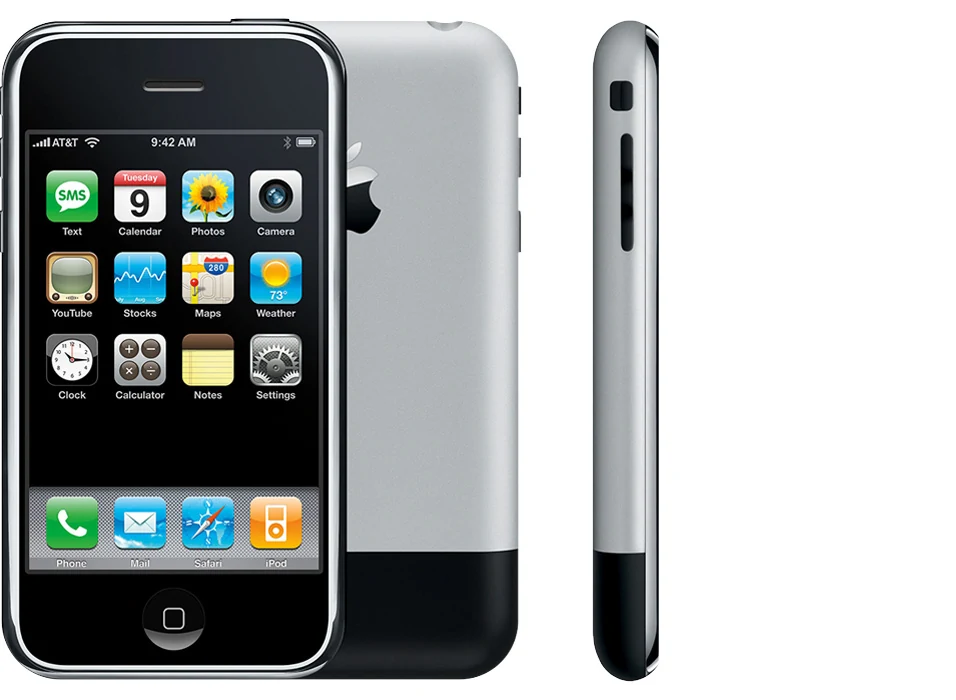
iPhone review summary
- The original iPhone joined a phone, music player, web browser, and touch-first interface in one carefully designed device.
- Its bright 3.5-inch screen, finger gestures, and readable desktop-style web pages were the main strengths reported at launch.
- Slow 2G EDGE data, no third-party native apps at launch, limited Bluetooth, and a recessed headphone socket were real drawbacks.
- Buy one for a collection or mobile-history project, not as a secure modern daily phone.
- Natural multi-touch gestures made scrolling and zooming easy to learn.
- The slim, balanced body was comfortable to hold in portrait or landscape.
- The screen showed readable text, strong color, and full web-page layouts.
- The 2G EDGE connection made mobile browsing slow.
- The first software release did not allow native third-party apps.
- The recessed headphone socket blocked many standard headphone plugs.
- Old batteries, unsupported software, and network limits make daily use risky now.
Editorial verification: MobileBurn editors verified the device specifications, ownership details, and material review findings before publication.
Why the first iPhone felt different
The original iPhone arrived in 2007, when many smartphones used a tiny physical keyboard, a stylus, or menus made for office work. Apple put most controls on one glass screen. A finger could tap, flick, and pinch the page. Those actions now seem ordinary, but period reviews treated the multi-touch interface as the phone's central idea.
The important change was not a single specification. It was the way the parts worked together. Calls, music, photos, email, and web pages shared the same clear controls. The home button gave users a simple way back when they felt lost. If you want to see how Apple's later phones grew from this start, the complete iPhone family page places each generation in order.
This was still a first attempt. The phone asked buyers to accept missing features in return for a better interface. That trade-off explains both the excitement and the sharp complaints in early hands-on assessments.
A small body built around touch
What this means for Original iPhone (2007)
The metal-and-black body weighed 135g and felt slim for its time. Period assessments described it as balanced and comfortable in either hand. Portrait use worked well with one hand, while turning the phone gave photos and web pages more room. The glass front, steel rim, aluminum back, and simple controls helped the device look more like one object than a group of parts.
The design also made some poor choices. Its standard-size headphone socket sat too deep inside the case, so many plugs could not reach it without an adapter. Bluetooth support was narrow, and the battery could not be removed by the owner. There was no official water-resistance rating. Anyone handling one now should treat it as a fragile old electronic item, not a protected modern phone.
The next model addressed some of the first phone's biggest connection limits. Our iPhone 3G record shows where Apple went after this design.
The screen and keyboard changed the habit
The 3.5-inch display was the main stage. Its 480 × 320 picture made text readable without shrinking every item into a tiny desktop menu. Reviews from the launch period praised its brightness, color, outdoor readability, and smooth-looking text. The glass collected fingerprints, but direct finger input was the reason the interface worked so well.
The on-screen keyboard was a bigger gamble. It offered more room when hidden, then appeared only when typing was needed. Some reviewers adapted quickly; others needed time to learn where a fingertip landed. There was no physical key shape to guide a thumb. Prediction and correction helped, but the keyboard was not instantly perfect for everyone.
Multi-touch was the stronger part of the experience. Pinching to zoom, flicking to scroll, and tapping a link matched the action users wanted. Those terms are now common entries in a phone technology glossary, which shows how much the interface shaped later devices.
Web browsing came with a slow connection
Safari showed pages in a layout closer to a computer than the stripped-down mobile pages common at the time. Users could zoom into a column, turn the phone sideways, and move around a full page. Email could show HTML messages, and Wi-Fi helped when a local network was available.
The radio was the larger problem. The original model used AT&T's 2G EDGE service in the United States instead of 3G. Period reviewers found mobile page loads slow, which worked against the rich pages the screen was designed to show. Some web plug-ins also did not work. The browser pointed toward the future, but the connection often pulled it back into the past.
Software was closed at launch. Apple did not yet offer the App Store or native third-party apps. Web apps were the approved path. That fact matters when comparing the phone with later models: the familiar iPhone software ecosystem did not arrive fully formed on day one.
Camera, battery, and missing features
The rear camera used a 2MP sensor. It could capture simple still images, but it lacked the flexible lenses, processing, and video tools buyers now expect. There was no front camera. Storage ranged from 4GB to 16GB, enough for a selected music library and some photos at the time, but very small beside a current phone.
Battery life depended on the job. The official record listed up to 7 hours of video playback, while period testing found roughly a working day's worth of continuous calling and shorter video endurance. The sealed battery was already a talking point. Nearly two decades later, battery condition is far more important than the original claim because lithium cells wear down with age.
Other omissions included GPS, 3G, richer Bluetooth functions, and native apps at launch. A specifications table can list those gaps, but it cannot explain how they affect a purchase. Use the phone comparison tool to place official fields side by side, then judge software and network support separately.
Is the iPhone right for you?
As a collection piece, it tells an important story. The value is in the interface and industrial design, not speed or camera quality. A buyer should confirm the exact model, storage, activation state, display condition, battery behavior, buttons, speaker, microphones, charging port, and repair history. Original packaging can matter to collectors, but it does not make the phone safer to use.
The original iPhone's best ideas survived because they reduced friction: touch the item, move the page, and return home with one button. Its limits also show why later phones needed faster radios, an app store, better cameras, and broader accessories. That makes it useful evidence of where the modern smartphone began, even when it no longer works as a modern smartphone.